Suno Board → Suno Downloader
Suno Downloader for Saving Your AI Music Library
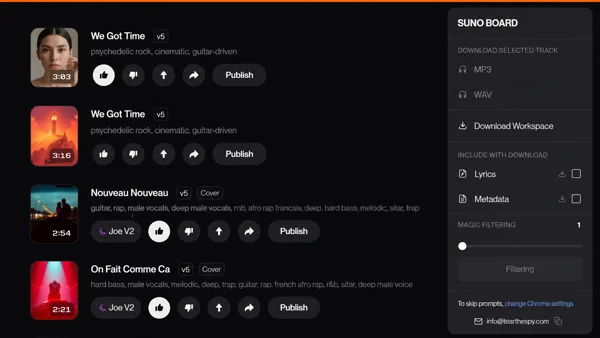
Suno Board is a Chrome extension that lets you download Suno songs as MP3 or WAV, save lyrics and metadata, and export your workspace locally — all from inside Suno, without opening a new tab or uploading anything to a third-party server. It is built for creators who want a faster, safer way to back up, organize, and reuse their AI music library.
The easiest way to download Suno songs is a Chrome extension that adds a dedicated Download button to your Suno workspace. Select a track, open the Download dropdown menu, then choose MP3, WAV, lyrics, metadata, or workspace export without leaving Suno.

Written by the Suno Board team
Tested with the current Suno web workspace interface. Updated May 2026.
Your Suno Library Is Not a Backup
Every song you create on Suno lives on Suno's servers. That is convenient until it isn't. Suno updates their platform, changes API access, or — in a worst case — something happens to your account. If the song is not on your drive, it is not yours in any practical sense.
Creators in the Suno Discord and on Reddit have said it plainly: "I realized we don't truly own our AI music unless it's on our hard drive." And: "Cloud storage isn't storage. It's just temporary access." Whenever platforms change rules, update features, or adjust access, creators remember the same lesson: your best work should not exist only inside a cloud account.
Downloading one by one gets painful fast. Once you have hundreds of tracks, the native download experience — one button, no lyrics, no metadata, no batch — becomes genuinely unworkable. A Suno library can become impossible to manage once you're past a certain size. A song without its lyrics, prompt, and metadata is harder to reuse, publish, or even find later.
Native Suno Download vs. Suno Board
Here is exactly what you get with the native Suno download button versus Suno Board.
| Feature | Native Suno | Suno Board |
|---|---|---|
| One-track download | ✓ | ✓ |
| Batch workspace download | ✗ | ✓ |
| MP3 export | ✓ | ✓ |
| WAV export | ✓ | ✓ |
| Lyrics included | ✗ | ✓ |
| Metadata included | ✗ | ✓ |
| Clean file organization | Limited | ✓ |
| Video workflow after download | ✗ | ✓ |
| Local processing — no server upload | ✓ | ✓ |
How to Download Suno Songs — Step by Step
Once Suno Board is installed from the Chrome Web Store, a Download button appears in the top bar of your Suno workspace. No setup, no configuration, no separate app to open.
How to download a Suno song: step by step
5 steps — from Suno track to local file
Go to suno.com/create or your Suno library
Suno Board only activates on those pages — the Download button in the top bar will not appear anywhere else on Suno.

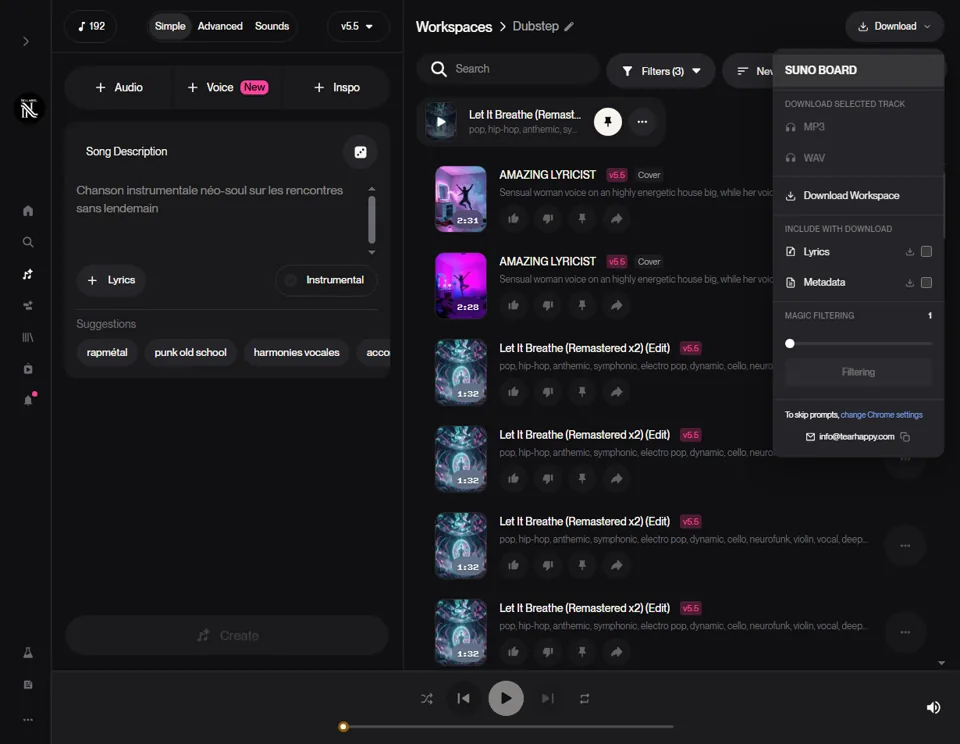
Select the track you want to export
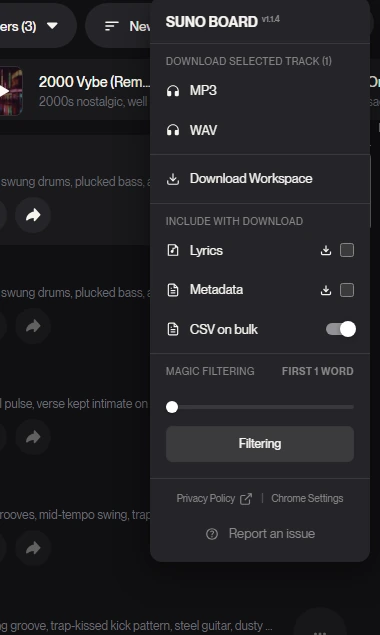
The Download dropdown enables MP3, WAV, Lyrics, Metadata, and Filtering options when a track is selected.
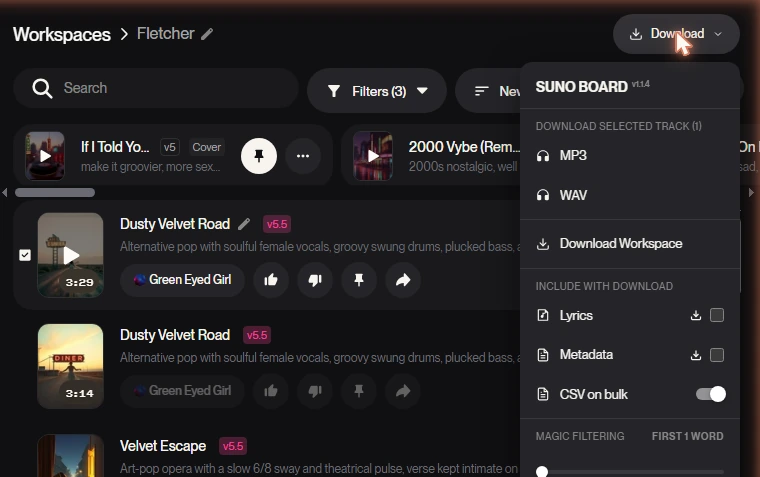
Choose MP3 or WAV from the dropdown
MP3 is for sharing and uploading to platforms. WAV is for production, editing, and archiving without quality loss.
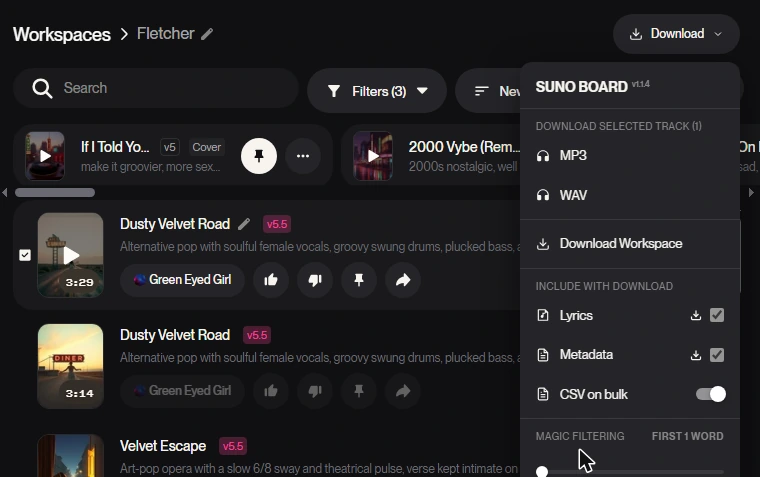
Select what to include
Under Include with download, toggle Lyrics and Metadata on. These are saved alongside your audio file automatically.
Download
The file goes directly from Suno's servers to your computer. Nothing passes through an external server.
What Suno Board Includes With Every Download
Most Suno downloader extensions stop at the audio file. Suno Board treats a download as a complete package — because a song without its lyrics and metadata is harder to organize, publish, and reuse.
- MP3 export — compressed format, ready for streaming, uploading, and sharing across YouTube, TikTok, and SoundCloud.
- WAV export — ideal for production, editing, and archiving when you want the highest-quality file available from Suno.
- Lyrics — the full song lyrics saved alongside the audio. Essential for lyric video creation, publishing descriptions, and archiving your catalog.
- Metadata — title, style tags, and prompt data saved with the download so your library stays organized and searchable over time.
- Download Workspace — export every song in your current Suno workspace in a single click instead of going track by track.
What a downloaded Suno song looks like locally
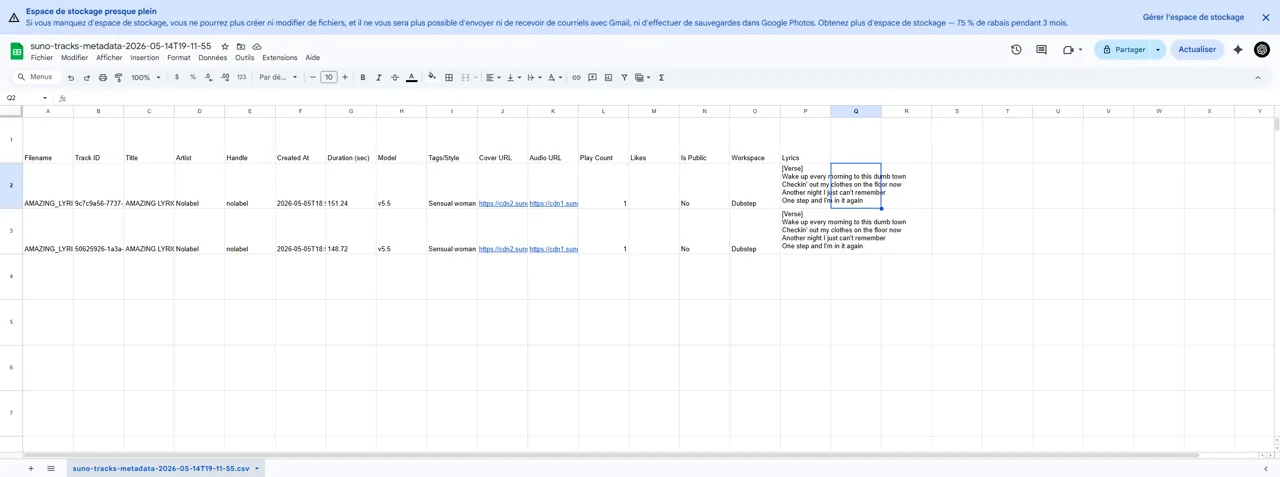
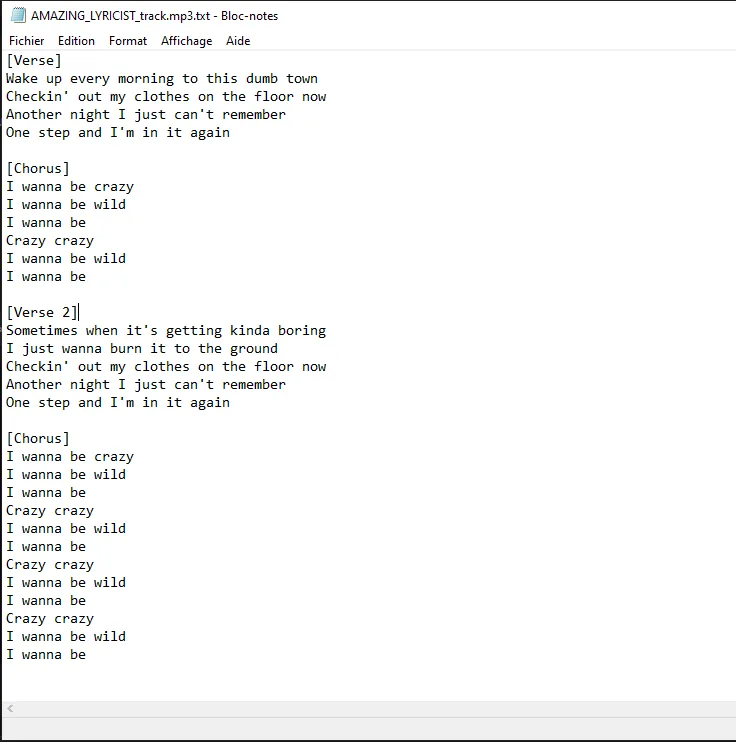
Files arrive with clean, readable names — no gibberish IDs, no raw hashes. The lyrics file contains the full song text. The metadata CSV contains the title, style tags, prompt, and audio URL for every track so your library stays organized and searchable over time.
Common Problems When Downloading Suno Songs
If you have tried other Suno downloader extensions before, you have probably run into at least one of these. Here is what goes wrong and why Suno Board handles it differently.
Files saved with unreadable names
Many extensions download songs as raw Suno track IDs — strings like af6b0c1d-c29c-4aaa.mp3. Once you have hundreds of files, your library becomes unsearchable. Suno Board saves files with the actual song title.
Lyrics not included
Suno's native download button exports only the audio. No lyrics file. Suno Board adds a Lyrics toggle under Include with download in the Download dropdown menu so your full song text is saved alongside every track.
Metadata missing
Without the prompt, style tags, and title data, an exported MP3 is an orphan file. Suno Board includes a Metadata toggle that saves everything needed to rebuild your catalog context.
Downloading one track at a time
The native Suno workflow requires clicking download on every track individually. With hundreds of songs, this is genuinely painful. Download Workspace in Suno Board handles an entire workspace in one action.
Extensions breaking after Suno updates
Suno's UI and API surface changes regularly. Competing extensions built on fragile scraping methods stop working silently after updates. Suno Board is built on Suno's session architecture and is actively maintained for compatibility.
Suno Board vs. Other Suno Downloaders
Many existing Suno downloader extensions focus on adding a simple download button. Suno Board is built for the larger creator workflow: download, organize, and create videos from the same workspace — without switching tools, opening new tabs, or stitching five apps together to publish one song.
Need to Download Your Entire Suno Library?
Download Workspace saves everything inside your current workspace. If you have hundreds of tracks spread across multiple workspaces — or you want to export your entire Suno catalog before a platform change — the Suno batch downloader handles that at library scale. Same format options, same metadata, just applied across your whole account at once.
100% Local — Your Audio Never Leaves Your Computer
Suno Board does not upload your songs to our servers. Downloads and exports happen locally in your browser.
When you download a track, the file transfers directly from Suno's servers to your device — the same path as the native Suno download button. Nothing is routed through Suno Board's infrastructure. Your session token, your audio files, and your account credentials never leave your machine.
Audio processing, video rendering, and all file exports happen locally on your device. No uploads. No middlemen. No analytics on your content or your account.
This matters because Suno's platform has access to your active session. Any extension that routes audio through an external server is asking you to trust that server with your account. Suno Board is engineered so that trust is never required.
After You Download: What Most Creators Do Next
A downloaded MP3 or WAV is the starting point, not the end. Most creators who use Suno Board for downloading also use it to turn those songs into something visual — either a lyric video with synced lyrics, a full music video with AI-generated visuals, or a tracklist compilation. That all happens inside the same extension, without switching to CapCut, After Effects, or any other editor.
Static-cover uploads can feel low-effort compared to lyric videos and visualizers. If you are publishing AI music on YouTube or TikTok, adding real visual production gives the video more value than a raw track over one still image. Your downloaded track is the raw material. The video is what makes it publishable.
Frequently Asked Questions
Can I download Suno songs as WAV? ↓
Yes. WAV is one of the two format options in the Download dropdown menu. The file is downloaded without re-encoding, preserving the original audio quality Suno generated.
Can I download Suno songs as MP3? ↓
Yes. MP3 is the other format option in the Download dropdown menu. It is the standard format for uploading to platforms, sharing with collaborators, and general listening.
Can I download my full Suno library at once? ↓
Yes. The Download Workspace option exports all songs in your current Suno workspace in one action. For your full library across multiple workspaces, the batch downloader is the right tool.
Can I download lyrics from Suno? ↓
Yes. The Include with download section in the Download dropdown menu has a Lyrics toggle. When enabled, the full song lyrics are saved as a text file alongside the audio.
Can I save Suno prompts and metadata? ↓
Yes. The Metadata toggle saves the song title, style tags, and prompt data with the download so your library stays organized and searchable over time.
Is it safe to use a Suno downloader Chrome extension? ↓
Suno Board operates within your browser using your existing Suno session. Your session token never leaves your device. Downloads go directly from Suno's servers to your computer — no external server receives your audio or account data.
Does Suno Board upload my songs to a server? ↓
No. Downloads and all exports happen locally in your browser. Your audio files are never uploaded to or stored on Suno Board's servers.
Will Suno Board work if Suno updates their interface? ↓
Suno Board is built on Suno's session architecture and is actively maintained to stay compatible with Suno UI and API updates. Extension compatibility is monitored on an ongoing basis.
Can I use downloaded Suno songs for YouTube? ↓
Suno Pro and Premier subscribers have commercial rights granted by Suno's terms of service. YouTube monetization is a separate gate — it requires content with genuine creative value such as lyric videos, visualizers, or edited video. A raw audio file over a static image is explicitly excluded from monetization under YouTube's 2025 policy update.
What is the best way to back up a Suno library? ↓
Use Suno Board's Download Workspace option to export all songs in a workspace locally, including lyrics and metadata. For large libraries across multiple workspaces, the batch downloader handles the full catalog.
Does Suno Board preserve audio quality when downloading? ↓
Yes. Suno Board downloads the original file directly from Suno's servers. There is no re-encoding, no server pass-through, and no quality loss. The file you receive is identical to what Suno generated.
Does Suno Board work with Suno's free plan? ↓
Suno Board works with any active Suno account. Download availability for specific tracks depends on your Suno plan and the download rights associated with your account tier.
 Install Suno Board from the Chrome Web Store
Download Suno songs as MP3/WAV, save lyrics and metadata, and back up your workspace locally.