Guide · TikTok, Reels & Shorts
How to Post Your Suno Music on TikTok, Reels, and YouTube Shorts
Suno Board turns Suno songs into TikTok-ready vertical videos.
Switch to portrait mode, select your track, trim the hook or chorus, choose a lyric style and visualizer, and export a 1080×1920 MP4 directly from your browser.
No crop step. No external editor. No upload to Suno Board servers.
Install Suno Board — free to install Install Suno Board — free to install
Best for

Written by the Suno Board team
Suno Board is built for the Suno creator community. This guide covers the actual portrait export and trimming workflow inside the Suno Board Chrome extension — the same tools creators use to clip and post Suno tracks to short-form platforms.
Why short-form vertical is where AI music gets discovered
TikTok, Instagram Reels, and YouTube Shorts are where new audiences find music they haven't heard before. A well-clipped 30–60 second segment with lyrics on screen and a visualizer behind it gives a track a real visual identity — not just an audio file sitting behind a cover image.
Watch time and viewer retention are major signals on all three platforms. A vertical video with motion — an audio-reactive waveform, lyrics animating in time with the track — gives viewers a reason to watch to the end rather than scrolling past. Suno Board handles the vertical format, the trimming, and the visual stack in one workflow inside your browser.
Audio-only post vs. vertical video with Suno Board
| Feature | Audio + Static Cover | With Suno Board |
|---|---|---|
| Export format | Audio file | 1080×1920 portrait MP4 |
| Aspect ratio | Depends on cover image | 9:16 — no crop needed |
| Visual movement during playback | Static image only | Visualizer and/or lyrics in motion |
| Audio-reactive visualizer | ✗ | ✓ |
| Lyrics overlay | ✗ | ✓ Nine styles |
| Time trimming | Manual clip in external editor | Drag handles on the progress bar |
| Custom artwork or cover | Static thumbnail only | Upload your own or use a Board-selected image or video |
| Ready to upload to TikTok/Reels/Shorts | Audio needs video wrapper | Ready-to-upload MP4 |
| Uses your Suno tracks directly | ✓ | ✓ |
| Time to post-ready | 15–30 min with external tools | Minutes after export |
What part of a Suno song should you clip?
Start with the strongest moment, not the beginning. On short-form platforms the first second determines whether someone keeps watching. Trim to the part of the track that earns attention fastest.
Best clip lengths for TikTok, Reels, and Shorts
| Length | Best for |
|---|---|
| 15–20 sec | Testing hooks, beat drops, and single lyric moments. Fastest to make, easiest to repost. |
| 30–45 sec | Choruses, emotional sections, and short music teasers. Long enough to leave an impression. |
| 60 sec | Full verse + chorus sections or storytelling songs. The standard for most Reels and Shorts. |
| Full track | When the visualizer and lyrics are strong enough to hold attention. Works well for ambient or instrumental tracks. |
How to export a Suno song for TikTok: step by step
6 steps — from Suno track to vertical video ready for upload
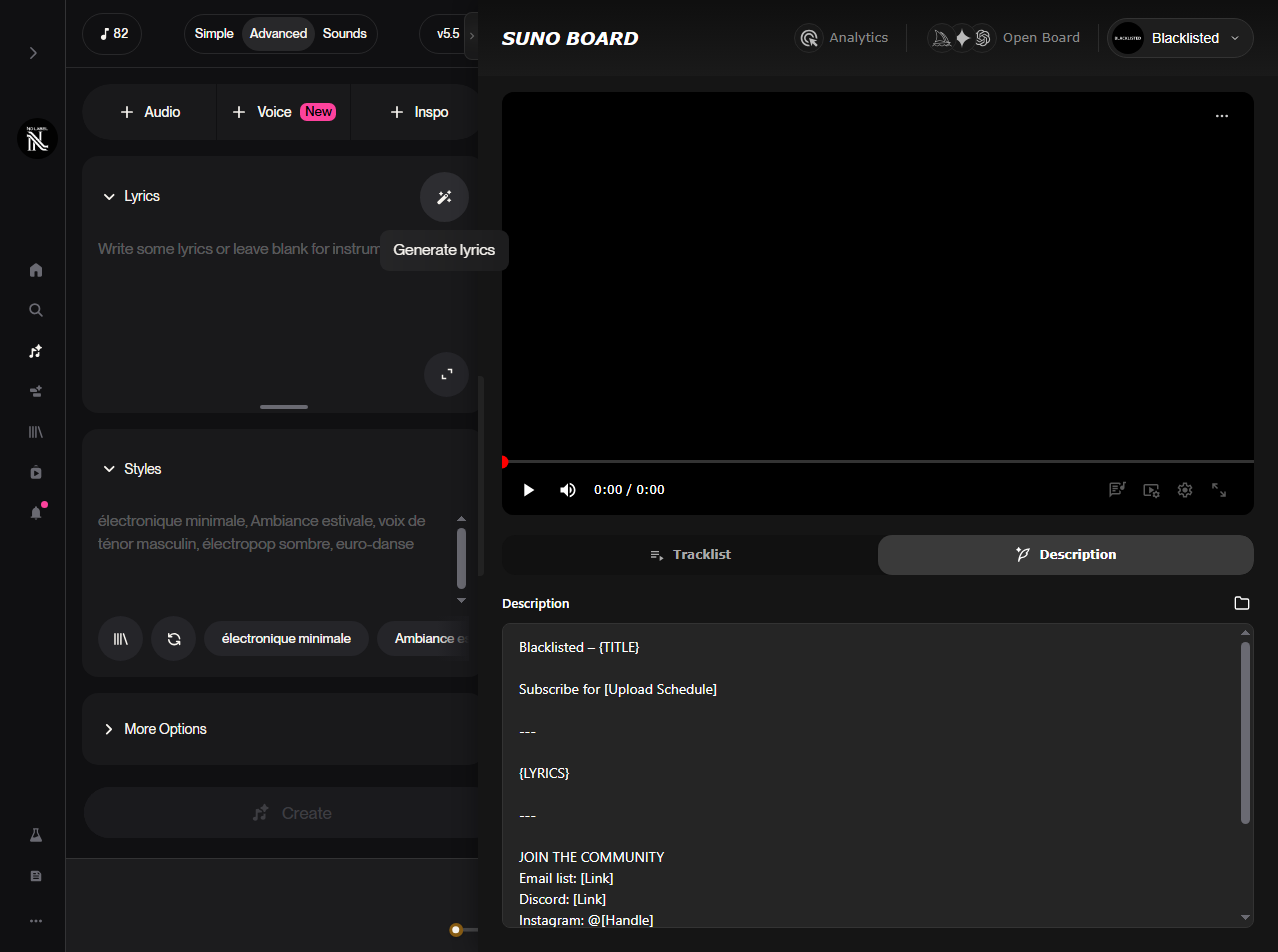
Go to suno.com/create or your Suno library
Suno Board only activates on those pages — the Board and all tools will not appear anywhere else on Suno.
Switch to portrait (9:16) mode
Activate portrait mode in the Board. The canvas switches to a 1080×1920 vertical layout — the native format for TikTok, Reels, and YouTube Shorts. No manual crop will be needed after export.
Screenshot: Board canvas in portrait mode
Set your trim range
The progress bar shows draggable start and end trim handles. Drag them to select exactly which segment of the song you want to export — a 30-second hook, a full minute, or anything in between. The exported clip contains only the selected range.
Screenshot: trim handles on the Board progress bar
Choose your visual stack
Set your background — a static cover, custom uploaded artwork, or a Board-selected image or video asset. Enable the audio visualizer if you want it. Choose a lyric overlay style from nine templates and adjust size, opacity, and words per line. Preview the clip in the Board before exporting.
GIF: portrait preview — Karaoke lyric style with visualizer
Export the vertical MP4
Click Download Video. Suno Board exports a 1080×1920 MP4 at 30fps to your device. The file contains only the trimmed segment you selected. No conversion or crop is required.
Screenshot: portrait export completing — 1080×1920 MP4
Upload and add your AI disclosure
Upload the MP4 to TikTok, Instagram Reels, or YouTube Shorts. Write your caption. Add an AI content disclosure — each platform handles this differently: TikTok uses the Creator Label in TikTok Studio, Instagram has its own labeling options, and YouTube Shorts uses the same "altered or synthetic content" checkbox as the main YouTube upload flow. Include a text disclosure in your caption as well.
Screenshot: TikTok upload screen — vertical MP4 selected
What Suno Board handles — and what you still do manually
Suno Board handles
- ✓ Exporting the 1080×1920 portrait MP4
- ✓ Trimming the clip to your selected range
- ✓ Applying lyrics, visualizer, and artwork
- ✓ Keeping the audio and render in your browser
You do manually
- — Upload the MP4 through TikTok, Instagram, or YouTube
- — Write your caption and add hashtags
- — Apply the AI content label in the platform's upload flow
- — Publish the video
Suno Board does not currently connect to your TikTok, Instagram, or YouTube account.
Caption templates for short-form platforms
Keep captions short on TikTok and Reels — the first line is what viewers see before tapping "more." When your platform requires it, add the AI content label. If you are unsure, disclose clearly in the caption. YouTube Shorts uses a separate description field.
Template A — AI-generated song
[Song title] — [genre/mood]

This song was created with Suno AI.
Video created with Suno Board.

AI-generated or AI-assisted music and visuals.

#SunoAI #AIMusic #AIGeneratedMusic
Template B — human-written lyrics
[Song title] — [genre/mood]

Lyrics by me. Music generated with Suno AI.
Video created with Suno Board.

AI-assisted music production.

#SunoAI #AIMusic #AIGeneratedMusic
Platform rules change often, so check each platform's current AI-labeling guidance before publishing — TikTok's Creator Label settings, Meta's AI labeling options, and YouTube Studio's altered/synthetic content disclosure.
If you are posting from a brand or business account, check the platform's music and commercial-use rules before using AI-generated music in promotional content.
What a finished clip looks like
Two typical export examples
Hook clip
Neon Dusk — chorus segment
1080×1920 · Karaoke lyric style · 00:42–01:12 trim · 30s clip
✓ Portrait format — no crop needed
✓ Visualizer active behind lyrics
✓ AI content label applied on TikTok
Full track clip
Glass Hours — full track
1080×1920 · Word Glow lyric style · full song duration · 3:12
✓ Custom artwork as background cover
✓ Cover fit set to fill
✓ Posted to YouTube Shorts + Reels
What Suno Board gives you for short-form video
1080×1920 portrait MP4 at 30fps
Native TikTok, Reels, and Shorts format — no crop step
Drag-handle time trimming
Select any segment of the song directly on the progress bar
Nine lyric overlay styles
Karaoke, Word Glow, Line Fade, Bounce, Typewriter, Subtitle, Spotlight, Slide Up, Stack
Customizable audio visualizer
Style, sensitivity, opacity, artwork pulse — fully controllable
Custom artwork or cover asset
Upload your own or use a Board-selected image or video
Cover fit: contain or fill
Choose how your artwork fills the portrait canvas
Lyric controls
Adjust size, opacity, and maximum words per line per style
Runs entirely in your browser
No upload to Suno Board servers — export stays on your device
Common problems and fixes
"The exported video is horizontal"
Portrait mode must be active before you export. Switch to 9:16 mode in the Board, verify the canvas is vertical, then export again.
"The trim handles aren't showing"
Time trimming is only available in single-track portrait mode. Make sure you are in portrait mode with one track loaded — not the multi-track tracklist view.
"My lyrics are cut off on the sides"
Reduce the lyric size or lower the maximum words per line in the lyric settings panel. Portrait canvases are narrower — shorter lines fit better.
"TikTok says the file format isn't supported"
Suno Board exports standard H.264 MP4. If TikTok rejects the file, check TikTok's current upload requirements — file size limits and codec requirements can change with TikTok app updates.
"I want to export the full song, not a clip"
Leave the trim handles at the default start and end positions covering the full waveform. The full song duration is exported when no trim range is set.
Privacy & rendering
Suno Board renders the portrait video entirely in your browser. Your Suno audio is never uploaded to Suno Board's servers. If you use a Board-selected image or video asset as your cover, that asset stays on your device throughout the export process. If you generate new AI visuals through supported model providers, those generation requests are handled by the selected provider — your Suno audio remains local during export. There is no connection to your TikTok, Instagram, or YouTube account — upload is always manual through the platform's own app or studio.
Also publishing on YouTube?
TikTok and Reels use 9:16 portrait. YouTube music videos use 1920×1080 horizontal — with auto-generated chapters, tracklist mode, and a description generator. Read the Suno to YouTube guide →
Short-form formats that work well with Suno Board
Hook or chorus clip
Trim to the strongest 15–30 seconds of the track — visualizer behind punchy lyrics
Full-track TikTok
Post the full song as a vertical video — Karaoke or Word Glow lyrics running throughout
Instagram Reels
1080×1920 MP4 uploads natively to Reels — add your cover art and caption
YouTube Shorts
Upload the same vertical export to Shorts — same AI disclosure flow as YouTube main
Genre or mood showcase
Short clips that demonstrate a specific Suno style or mood — great for discovery
Beat drop highlight
Trim exactly to the drop or bass hit — visualizer reacts to the peak energy
Lyric highlight
Spotlight or Typewriter style on a strong lyric line — text-forward short-form content
AI music channel content
Regular short-form posts building a Suno-based music presence across platforms
Lyric styles for portrait video
Nine overlay styles available in portrait export — each with independent size, opacity, and max-words controls
Karaoke
Words highlight in sync with the audio — classic karaoke read-along style.
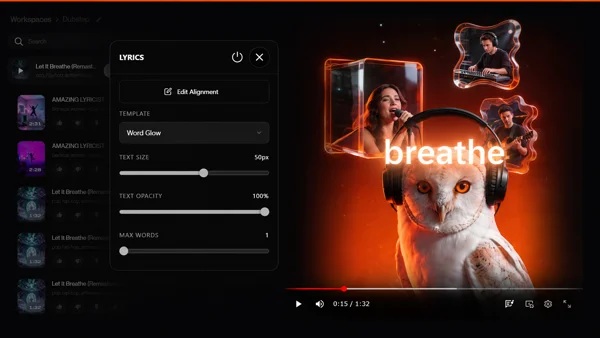
Word Glow
Each word glows as it lands — soft, ambient feel that works for most genres.
Line Fade
Full lyric lines fade in and out. Minimal, readable at a glance.
Bounce
Words animate with a bounce motion — energetic, suited to uptempo tracks.
Typewriter
Characters type out one by one — deliberate, text-forward style.
Subtitle
Standard subtitle-style overlay — clean, unobtrusive, maximally readable.
Spotlight
Active word or line is spotlit while the rest recedes — focused, cinematic feel.
Slide Up
Lyric lines slide in from below — smooth, modern short-form style.
Stack
Lines stack vertically as they appear — cumulative, building visual presence.
Frequently asked questions
Does Suno Board export vertical 9:16 video for TikTok?
Can I trim a Suno song to a shorter clip for TikTok?
What lyric styles are available for TikTok exports?
Does Suno Board upload directly to TikTok?
Do I need to disclose AI content on TikTok?
Can I use Suno music in Instagram Reels?
Can I use Suno music in YouTube Shorts?
What resolution does Suno Board export for TikTok?
Can I add a visualizer to a TikTok export?
Do I need commercial rights from Suno to post on TikTok?
Can I use my own artwork as the background for a TikTok export?
What is different about the TikTok export vs the YouTube export in Suno Board?
Turn your Suno tracks into TikTok-ready clips today
Install Suno Board, switch to portrait mode, trim your clip, and export a 1080×1920 MP4 in minutes — free to install.
Install Suno Board — free to installChrome Web Store · No account required
Related guides