Suno Board → Suno Lyric Video Maker
Make Suno Lyric Videos in Seconds
Suno Board is a Chrome extension with a built-in lyric video maker. Select any Suno song, sync its lyrics, choose a render mode, and export a full 1920×1080 lyric video — with your track's lyrics displayed over a visual background — entirely in your browser. No upload to any third-party service. No video editing software required.
The fastest way to create a Suno lyric video is a tool that already has your songs and your lyrics in one place. Suno Board works inside your Suno workspace, so there is no downloading your audio, opening a separate editor, or copying lyrics by hand.
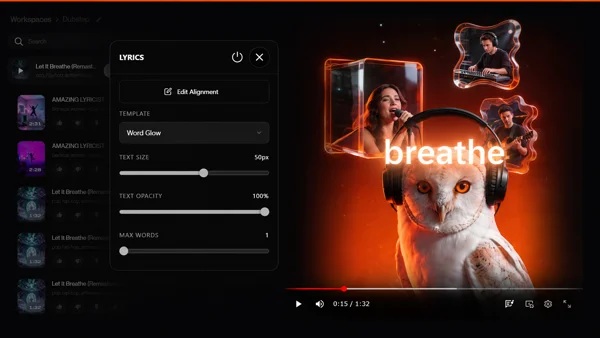

Written by the Suno Board team
Tested with the current Suno web workspace interface. Updated May 2026.
A Static Image Is Not a Lyric Video
Many Suno creators publish the fastest way possible: export the audio, place it under one still image, and upload it.
That can work, but it is also the lowest-effort version of the workflow.
A lyric video adds a real visual layer to the song. It gives viewers something to follow, keeps the track more engaging, and makes the final upload feel more like a finished music video instead of a raw audio file with a cover image.
That matters even more for creators publishing AI music. YouTube allows creators to use AI tools, but monetized channels still need to follow YouTube's reused, repetitive, and original-content policies. If your goal is to build a serious music channel, adding synced lyrics, visualizers, and edited video structure is a safer and stronger creative direction than relying on static-cover uploads alone.
The problem is that traditional lyric videos take too much work. You export the audio, open CapCut or After Effects, paste the lyrics, time every line, choose a background, render, and export. For one song, that is annoying. For a catalog of 50 songs, it becomes a second job — and that is before you factor in a large library. If you need to get your songs local and organized first, the Suno batch downloader handles that in one click.
Suno Board removes that friction by keeping the song, lyrics, visualizer, preview, and export inside one browser workflow.
Manual Lyric Video Workflow vs. Suno Board
Here is what creating a lyric video looks like the traditional way versus using Suno Board's built-in lyric video maker.
| Feature | Manual / Other Tools | Suno Board |
|---|---|---|
| Works inside Suno | ✗ | ✓ |
| Lyrics auto-imported from your track | ✗ | ✓ |
| No audio upload to a third-party | Limited | ✓ |
| Built-in audio visualizer | ✗ | ✓ |
| Lyrics + visualizer in one export | ✗ | ✓ |
| Export at 1920×1080 | ✓ | ✓ |
| No video editing skills needed | ✗ | ✓ |
| No separate video editor required | ✗ | ✓ |
How to Create a Suno Lyric Video — Step by Step
Once Suno Board is installed from the Chrome Web Store, the lyric video maker is part of the same workspace you already use for downloading. No second app, no second account, no second login.
[ GIF: Lyric video creation workflow ]
Open panel → select track → sync lyrics → choose template → render mode → preview → Download Video
How to make a Suno lyric video: step by step
5 steps — from Suno track to local lyric video
Go to suno.com/create or your Suno library
Suno Board only activates on those pages — the panel and all tools will not appear anywhere else on Suno.

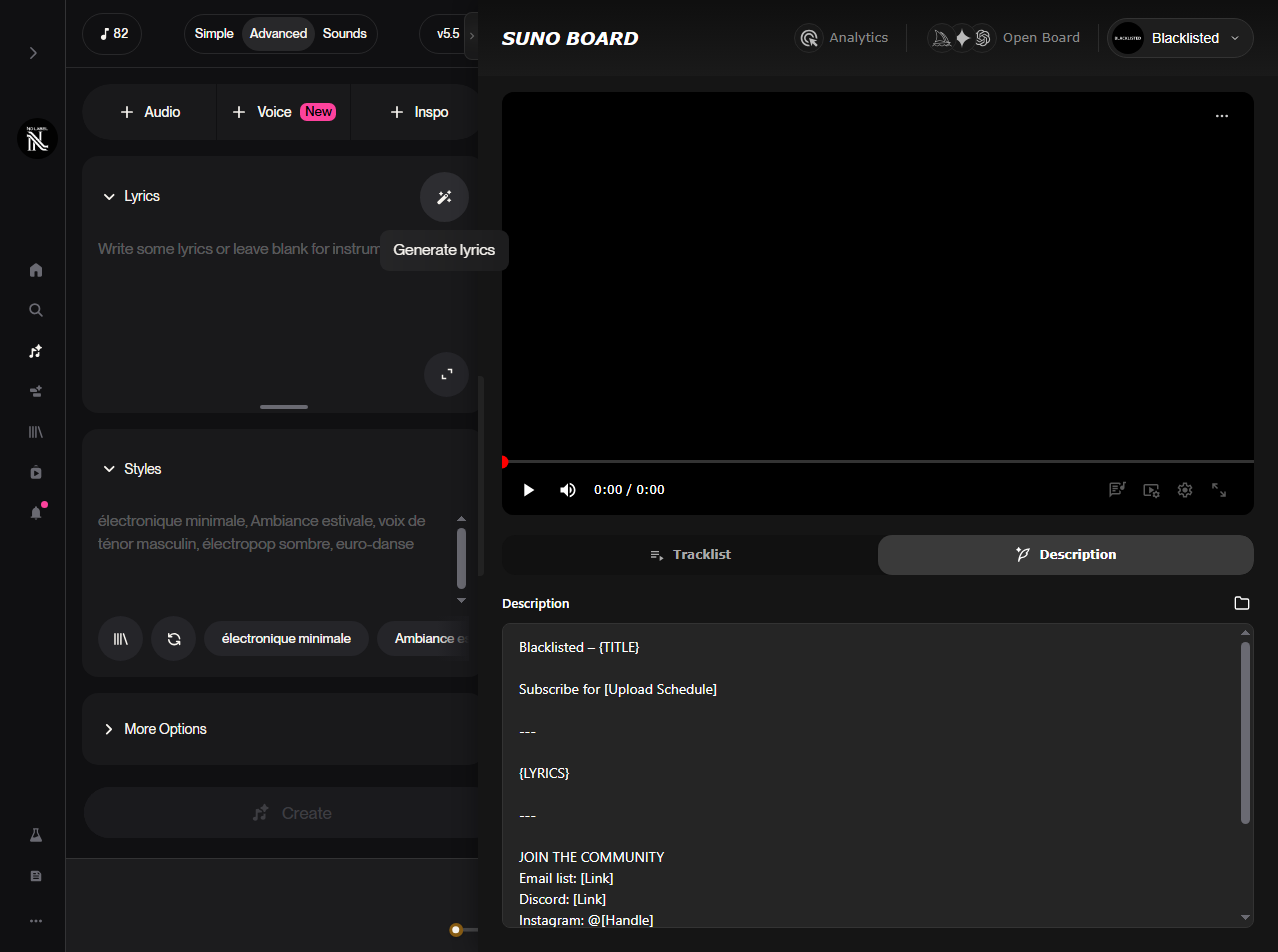
Drag and drop a song into the video workspace
Drop the track you want to turn into a lyric video directly into the Board so the workspace loads that song and its cover.
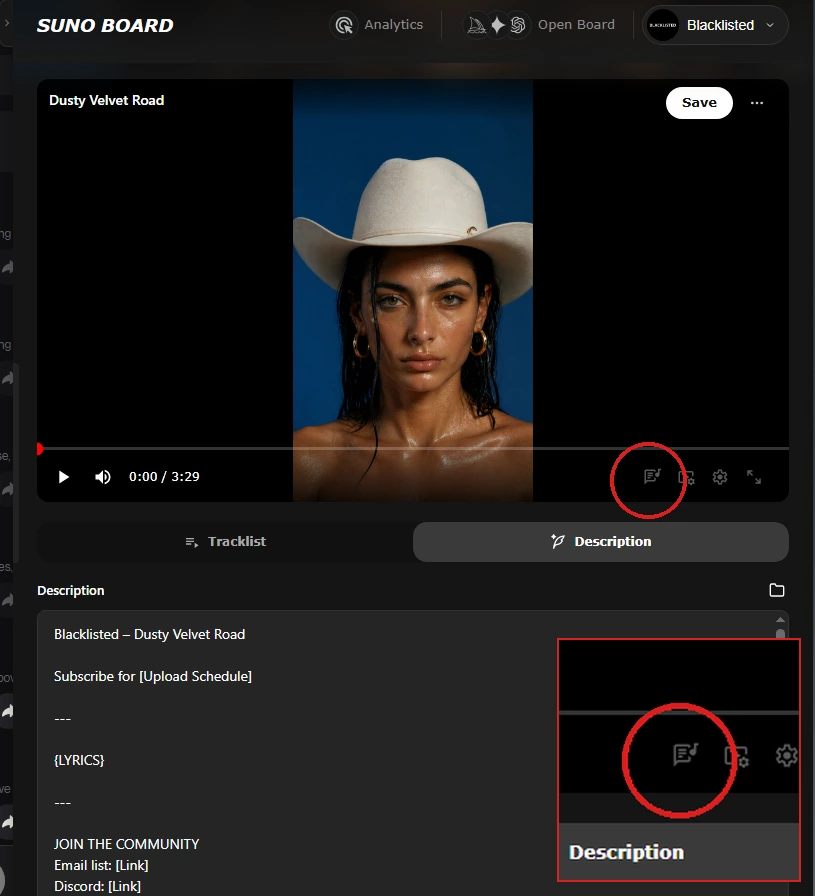
Click the Lyrics button, then click Sync Lyrics
The Lyrics button is the first icon in the video panel controls. Click it to open the lyrics settings panel. Inside, you'll see a Sync Lyrics button — click it and Suno Board fetches word-by-word timing directly from Suno, automatically. No manual input required. Once synced, the template selector and the on/off toggle appear. The power button in the panel header lets you turn lyrics on or off in the preview at any time without losing your settings.
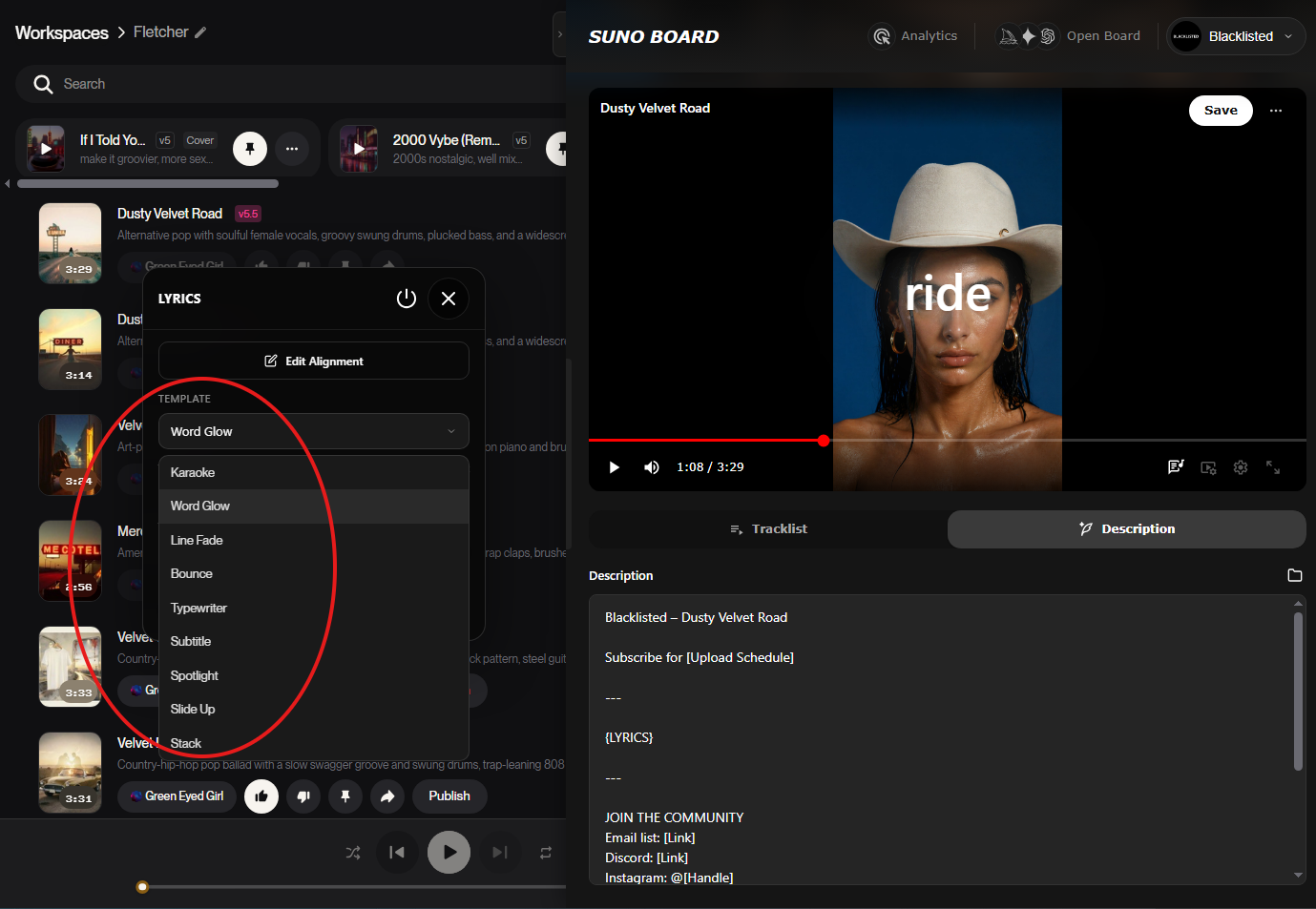
Select a lyric template
The template dropdown offers nine animation styles: Karaoke, Word Glow, Line Fade, Bounce, Typewriter, Subtitle, Spotlight, Slide Up, and Stack. The moment you pick one, it activates — no confirm button, no extra step. Switch between them freely until the style fits the song.
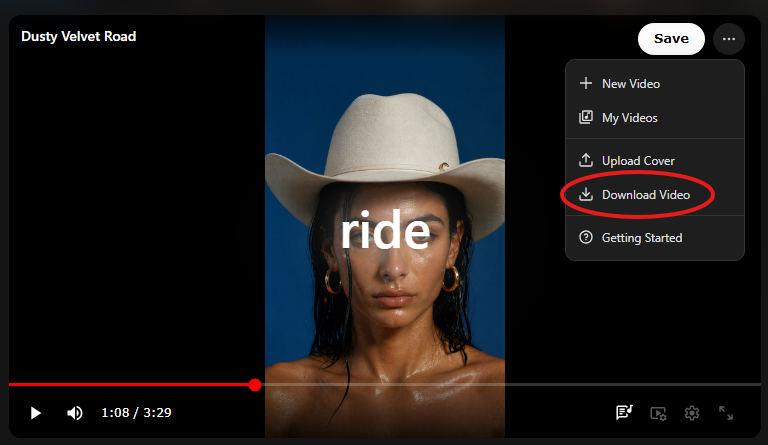
Download your lyric video
Open the ··· menu at the top of the video panel and click Download Video. The MP4 saves directly to your computer at 1920×1080 resolution. Nothing passes through an external server.
What the Suno Board Lyric Video Maker Includes
Most lyric video tools give you a text editor and a blank canvas. Suno Board's lyric video maker is integrated with your Suno library, so the hard parts are already done by the time you open the panel.
- Automatic lyrics import — your song's full lyrics pull directly from Suno. No copying text from the Suno interface. No risk of missing lines or formatting errors.
- Four render modes — lyrics only, lyrics with visualizer, visualizer only, or static background. Each mode produces a complete video; the choice depends on the visual feel you want.
- Built-in visualizer — add a real-time audio visualizer to your lyric video in the same export. No separate visualizer tool required.
- 1920×1080 export — Full HD output for YouTube and horizontal music videos. For TikTok, Reels, and Shorts, a vertical crop is recommended when available.
- Local rendering — the entire video is rendered on your device. Your audio never leaves your computer. No third-party server is involved in the creation or export process.
- No software installation — the lyric video maker runs inside your Chrome browser as part of Suno Board. No CapCut, no After Effects, no Premiere Pro subscription needed.
Output quality is a first-class priority in the lyric video export.
Suno Board exports at 1920×1080 and is built to preserve a clean, strong image instead of treating the video layer as an afterthought. The goal is a file that already looks publish-ready when it lands on your computer.
The audio side matters just as much. Suno Board muxes the exported video with the song as a priority, so the final MP4 keeps the track sounding as strong and intact as possible instead of feeling like the audio was degraded just to get a video out the door.
Common Problems When Creating Lyric Videos for Suno Songs
If you have tried to create lyric videos from Suno tracks before, you have likely run into at least one of these.
Uploading audio to a web-based lyric video tool
Most online lyric video tools require you to upload your audio file before you can create anything. You are handing your Suno track to a third-party server without knowing how it is stored or used. Suno Board renders everything locally — your audio never leaves your computer.
Copying lyrics manually into a video editor
Without an integration between your Suno library and your video editor, you have to manually copy lyrics from the Suno interface into the tool, then re-time each line. For a single track that is tedious. At catalog scale, it is a reason most creators just skip lyric videos entirely. Suno Board imports lyrics automatically.
Exporting at the wrong resolution
Free tiers on many lyric video tools cap export resolution at 720p or watermark the output. Suno Board exports at 1920×1080 without watermarks. The file you get is the file you publish.
No visualizer option
Basic lyric video tools show lyrics over a static background. Suno Board includes a built-in visualizer that reacts to the audio in real time. The lyrics + visualizer render mode combines both in a single export.
Static-image uploads getting limited by YouTube policy
YouTube's 2025 policy update is explicit: AI audio over a static cover image does not constitute genuine creative value. Channels that built their library on static uploads have been demonetized. A lyric video produced with Suno Board — with real visual elements, synced lyrics, and a visualizer — is the practical response to this policy reality.
100% Local Rendering — Your Audio Never Leaves Your Computer
Suno Board does not upload your songs to our servers. Downloads and exports happen locally in your browser.
When you create a lyric video with Suno Board, the entire rendering process happens on your device. Your audio is read locally, your lyrics are imported locally, and the exported MP4 is written directly to your computer. No file is sent to Suno Board's infrastructure at any point in this process.
This is true for single-track lyric videos, visualizer exports, and every other video format Suno Board produces. Local rendering is not a marketing claim — it is the architecture. The extension has no mechanism to upload or store your audio.
This matters practically because most online lyric video tools are built around a server-side rendering pipeline. You upload your audio, their servers render the video, and they send it back. Suno Board skips all of that. Your Suno track never touches a third-party server.
Beyond the Lyric Video: What Creators Build Next
A lyric video is a fast, reliable way to publish. Once you have the workflow down, the natural next step for most creators is pushing further — adding AI-generated visuals, building a full Suno music video with images and transitions, or creating a multi-track compilation for a YouTube channel. All of that happens inside the same Suno Board panel, without switching tools.
If you have a large Suno library and want to create lyric videos for multiple songs without downloading them manually first, the batch downloader handles getting your full catalog local and organized before you start.
Who Uses Suno Board for Lyric Videos
Suno Board's lyric video maker fits anywhere a creator needs to go from song to publishable video quickly. Here are the most common use cases.
YouTube lyric videos
Publish full-length lyric videos for your AI music channel.
Single releases
Give every new track a proper video on release day.
TikTok and Shorts
Clip the hook section and post with lyrics for short-form content.
Album visualizers
Create a consistent visual identity across a full album release.
Lo-fi and ambient loops
Add lyrics and a visualizer to long-form sleep or study tracks.
Music promotion
Fan-facing videos that give listeners something to follow and share.
Promo clips
Canvas-style previews for Spotify or social media teasers.
AI music channels
Build a consistent catalog of lyric videos at scale without a team.
Lyric Video Styles You Can Create
Suno Board's render modes and visual settings let you match the visual feel to the song's genre and mood. Here are some directions creators commonly take.
Minimal black and white
Clean, typography-forward. Works for any genre.
Anime lo-fi
Soft, warm tones with a visualizer. Perfect for lo-fi beats.
Cyberpunk visualizer
High-contrast audio-reactive visuals for electronic and synthwave.
Cinematic dark background
Full-bleed dark canvas. Lyrics as the focal point.
Abstract visualizer
Audio-reactive shapes and motion behind the lyrics.
Lyrics only — no visualizer
Pure text on background. Fast, clean, distraction-free.
Frequently Asked Questions
How do I make a lyric video from a Suno song? ↓
Install Suno Board from the Chrome Web Store. Go to suno.com — the Suno Board panel opens. Select your track, click the Lyrics button, then click Sync Lyrics so the lyric timing imports automatically. Choose a template and render mode, preview the video, then open the ··· menu and click Download Video to save the MP4 to your computer.
Does Suno Board sync lyrics automatically to the music? ↓
Yes. Click the Lyrics button, then Sync Lyrics, and Suno Board fetches word-by-word timing directly from Suno. The live preview lets you see how the lyrics appear across the video before you export.
What video format does Suno Board export lyric videos in? ↓
Suno Board exports lyric videos at 1920×1080 (Full HD). This meets the standard upload requirement for YouTube and most other platforms.
What resolution are Suno Board lyric videos? ↓
Suno Board exports lyric videos at 1920×1080 (Full HD). This meets the standard upload requirement for YouTube and most other platforms.
Can I add a visualizer to my Suno lyric video? ↓
Yes. Suno Board includes a lyrics + visualizer render mode that combines synchronized lyrics with an audio visualizer in the same export. No separate visualizer tool is required.
Can I upload a Suno lyric video to YouTube? ↓
Yes. The MP4 from Suno Board can be posted to TikTok. TikTok requires AI-generated content to be labeled using their native AI content toggle. Unlabeled AI content is subject to removal or reduced reach under TikTok's content policies.
Can I post a Suno lyric video to TikTok? ↓
Yes. The MP4 from Suno Board can be posted to TikTok. TikTok requires AI-generated content to be labeled using their native AI content toggle. Unlabeled AI content is subject to removal or reduced reach under TikTok's content policies.
Does Suno Board upload my audio to create the lyric video? ↓
No. Suno Board renders lyric videos entirely within your browser. Your audio files are never uploaded to Suno Board's servers or any third-party service. Rendering, export, and file storage all happen locally on your device.
Is Suno Board free for lyric video creation? ↓
Yes. Suno Board is free to install from the Chrome Web Store. The lyric video maker, visualizer, and video export are available within the extension.
Do I need video editing experience to create a Suno lyric video? ↓
No. Suno Board's lyric video maker is designed for creators without a video editing background. Lyrics import automatically, visual styles are selectable, and the export is one click. No timeline editing, no asset management, no software installation required.
What is the difference between a Suno lyric video and a Suno music video? ↓
A lyric video displays the song's text over a visual background — typically with a consistent style and visualizer. A music video uses AI-generated images, transitions, and edited sequences for a more cinematic result. Suno Board supports both. The lyric video maker is the fastest path to a publish-ready video. The Suno video maker is for full music video production.
Will a lyric video help my Suno songs perform better on YouTube? ↓
A lyric video adds real visual value — synced text, motion, and a visual layer that makes the video more engaging to watch. YouTube's monetization policies require content to follow guidelines around reused and repetitive uploads. Adding lyric overlays and visualizers is a stronger creative direction than static covers, and makes your videos more watchable regardless of platform policy.
 Install Suno Board from the Chrome Web Store
Create lyric videos from your Suno songs — locally, with synced lyrics and visualizers, at 1920×1080.